Finding overlapping VoDs
Pick VoDs from the same session in your library, or search another streamer for a VoD that overlaps one you hold, then open them in the sync editor.
Last updated Oct 26, 2026
Two VoDs can only be synced if the streams were live at the same time. This page covers how the library shows which of your VoDs overlap, and how to search for a VoD you do not have yet.
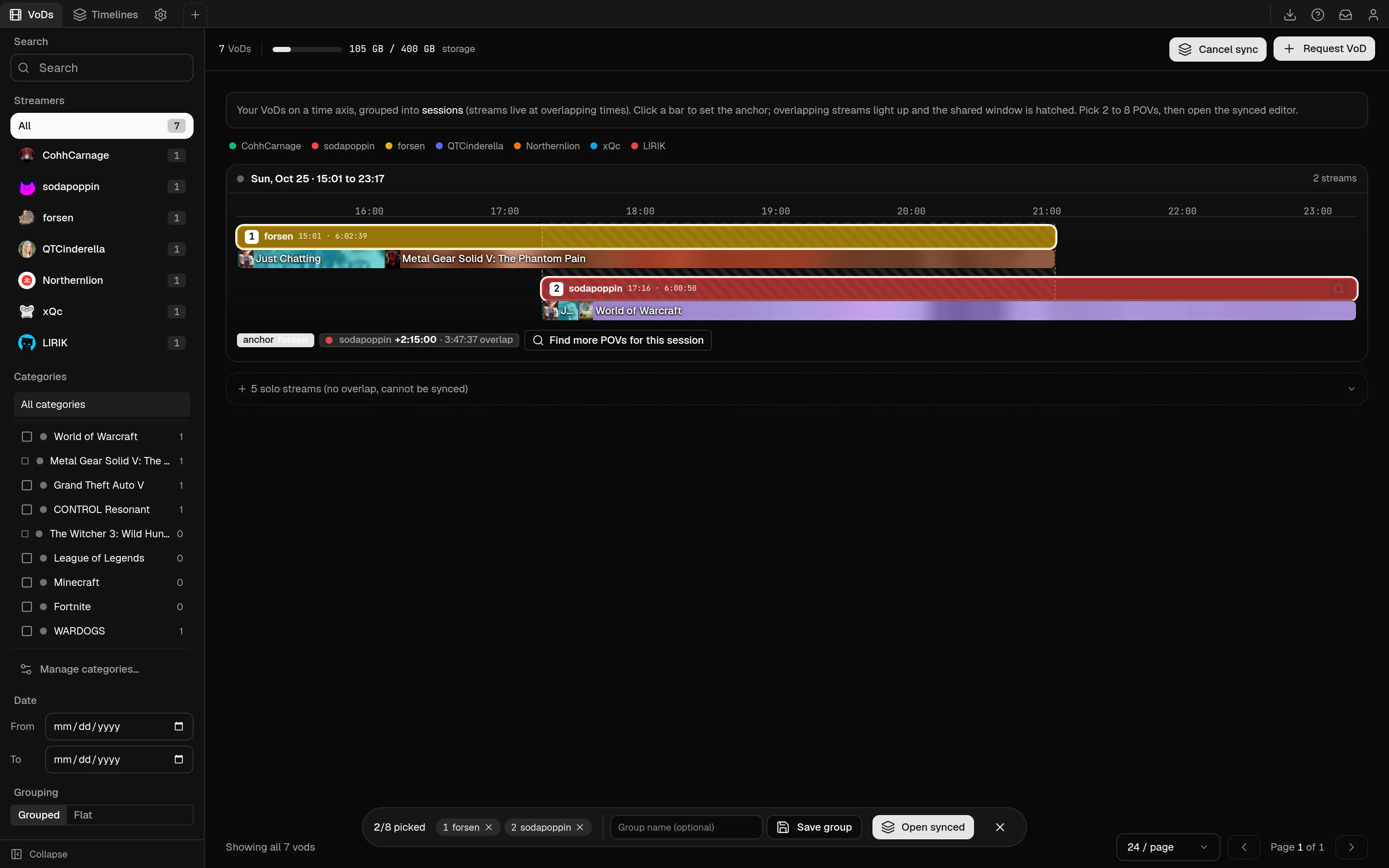
Pick from your library
In the VoD library, select Sync VoDs. The library switches to a time axis. It also opens this way from /sync/new, and from the Sync button in a VoD's editor, which picks that VoD for you.
The axis shows your VoDs as bars, grouped into sessions, which are streams that were live at overlapping times. Click a bar to set the anchor. The streams that overlap it light up, and the shared window is hatched. Pick two to eight VoDs. The count shows as N/8 picked, with the streamer's name on each pick, and you can remove one with its X.
When you have at least two, select Open synced. The picks open in the sync editor. To keep a set for later, type a name in Group name (optional) and select Save group. Leave the picker with Cancel sync.
VoDs that overlap nothing else are collected under a solo streams (no overlap, cannot be synced) line. VoDs with no broadcast date cannot be placed on the axis, and land there too.
Search for another streamer's VoD
Each bar has a search button, titled Find overlapping streams from other streamers. The same search is the Find overlapping stream… item in a VoD's menu in the library, and the Find overlap button in the editor.
- Type a Twitch username in the box, such as someone the streamer played with, and select
Search. - The dialog,
Find overlapping stream, looks through that channel's most recent archive VoDs, up to 100, and lists the ones whose broadcast window overlaps yours. - Each result shows the overlap in time and as a percentage of your stream. The best overlap is first.
- If you already hold the VoD, select
Sync now. Otherwise selectRequest, choose a quality, and the VoD downloads in the background. The button then readsRequested.
Once both VoDs have finished downloading, open them together from the library. Requesting works as in Request a VoD.
When nothing overlaps
If the channel has no archive that overlaps, the dialog says No overlapping VoDs found in the streamer's name, and that they may have streamed at a different time or the VoD has expired. Twitch keeps a VoD for 7 days for standard broadcasters, 14 for affiliates and 60 for partners, so an old stream may be gone.
In the library picker, if no session has two streams, it says No overlapping sessions found. and that sync needs two streams that were live at the same time. Use a bar's search button to find another streamer's overlapping VoD.
If the VoD you start from has no broadcast date, the dialog says Reference VoD has no broadcast date, so overlap cannot be computed.
Sync editor
Edit several streamers' VoDs of the same moment on one timeline. How streams line up by Twitch recorded_at, the Sync panel, chat graphs, clips and export.
VoD library
Every VoD you hold, with its clips. Read the cards and their Play, Queued and Retry buttons, see what a download uses, and remove a VoD safely.