
Pricing
Plan ladder, the four quotas, and what's included
Vod.ing has a single feature set across every plan (current prices and the calculator are on the pricing page). Tiers differ only in size: you pick a storage amount and the three monthly quotas scale with it. Every plan can use the editor, multistream, chat overlays, the timeline maker, the FCPXML export, the auto highlight finder, every panel, every emote source — all of it.
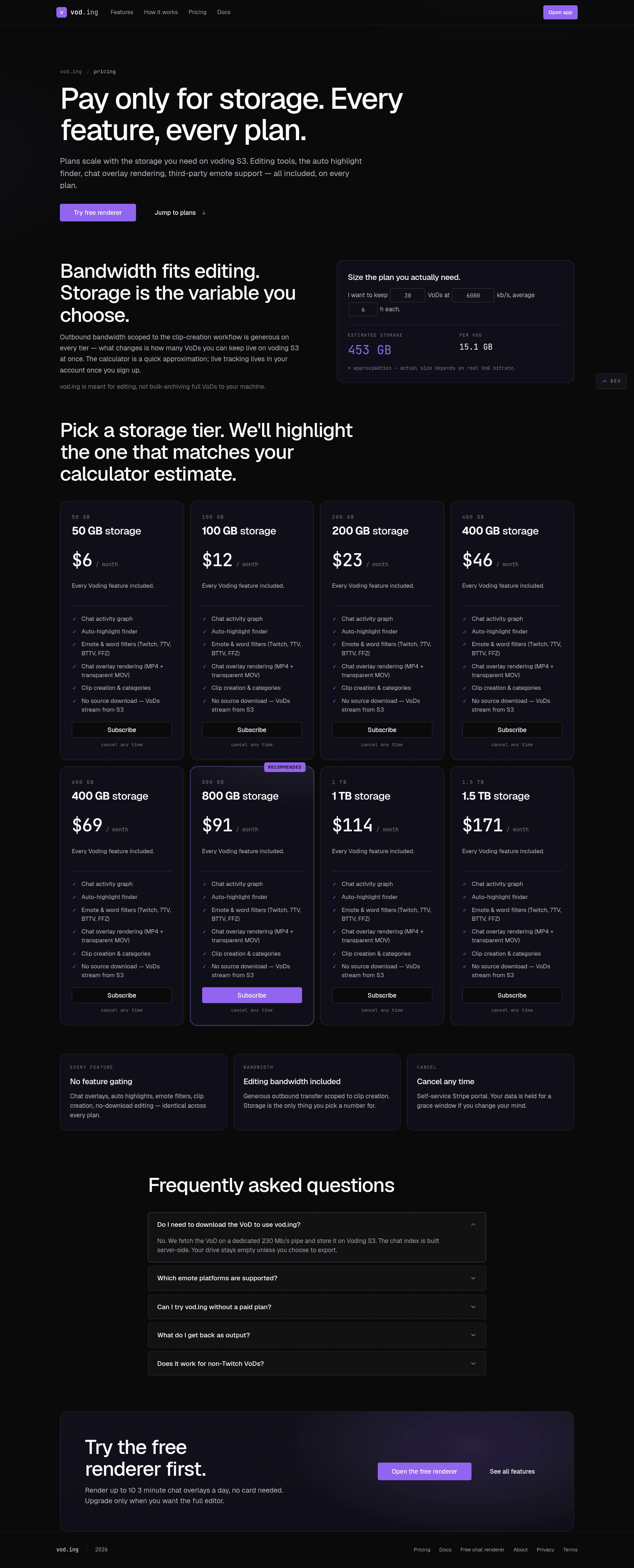
The calculator at vod.ing/price takes the tier you drag to, your usual stream length and the quality you plan to request at (720p, 1080p or 1440p), and tells you how many VoDs you can keep online at once and how many new ones you can pull from Twitch per month. Type a Twitch channel name and it sizes that channel's real VoDs instead — hours per streaming day, streaming days per week, and the bitrate Twitch actually serves for each quality — and names the plan that holds a month of them. It reads the channel's newest 100 archives, capped at 60 days, and counts a streaming day as one sitting: archives 4 h or lessours apart are the same day, so a stream that runs past midnight is not counted twice. Every tier's four quotas are listed on the result card and in the compare table.
The four quotas
| Quota | What it counts | Resets |
|---|---|---|
| Storage | Everything held in your library right now: source video + chat for each VoD, plus rendered clips and overlays | Never — it's a ceiling. Remove VoDs or clips to free space |
| VoD ingest | Bytes pulled from Twitch into Vod.ing when you request a VoD | Every billing month |
| Bandwidth out | Clip MP4s, chat overlay renders and timeline bundles you download. Playback in the editor is not metered | Every billing month |
| Render compute | Server time spent rendering clips and chat overlays | Every billing month |
Ingest is deliberately several times larger than storage. Storage is what you keep; ingest is what you cycle through. When your library is full, remove the VoDs you have finished cutting and request new ones — the ingest quota covers the churn.
Your live usage on all four is under Settings → Usage. Your plan's caps are on Settings → Plan.
What "storage" means
Storage is two things rolled into one bucket:
-
Source video. Every requested VoD's HLS segments plus the chat log. Size scales with the quality you pick when requesting. For a 6-hour broadcast:
Quality Sized at 6 h of VoD 720p 3 Mbps ≈ 8 GB 1080p 6 Mbps ≈ 16 GB 1440p (HEVC) 7.5 Mbps ≈ 20 GB These are steady-state storage sizes. At request time we reserve a little more (Twitch's declared bitrate plus 10 % head-room) and settle to the real size once the download finishes.
-
Render outputs. Every rendered clip MP4 and chat-overlay MOV. A 60-second 1080p clip is around 30–80 MB depending on motion.
Both count against the same cap. When you hit the cap, the editor refuses to request new VoDs or enqueue new renders until you remove some VoDs or delete clip outputs.
Removing a VoD
Open the ⋯ menu on any VoD in your library (or right-click the row) and pick Remove from library. The space is freed immediately and the toast offers Undo, which puts the VoD back at no cost. We keep the data for 15 days, so requesting the same VoD again inside that window restores it instantly with your clips intact — but that is a fresh request, so it counts against storage and ingest again. A VoD that is still downloading offers Cancel download instead; a cancelled ingest is not charged for storage, only for the ingest and compute used so far.
Removing a VoD does not refund the ingest it consumed when it was first requested.
Bandwidth
Outbound bandwidth has its own monthly quota (the bandwidth out row above); it does not eat into storage. Every plan's outbound quota is a multiple of its storage, so downloading every clip you render is expected use, not something to ration.
Cancellation
Cancellation is one click in your account menu. The plan stays active through the end of the paid period, then drops your account to read-only:
- You can still sign in.
- You can still view existing clips and re-download MP4s (subject to bandwidth).
- You cannot request new VoDs or enqueue new renders.
- After 90 days of inactivity, source VoDs become eligible for cold-storage tier-down. Rendered clips and overlays are kept indefinitely.
Re-activating restores full access immediately; nothing is lost.
Invoices and tax
Stripe handles billing. The portal accessible from the account menu has every invoice, your payment method, and your VAT/tax ID if you need to add one. Receipts go to the email on your Twitch account.