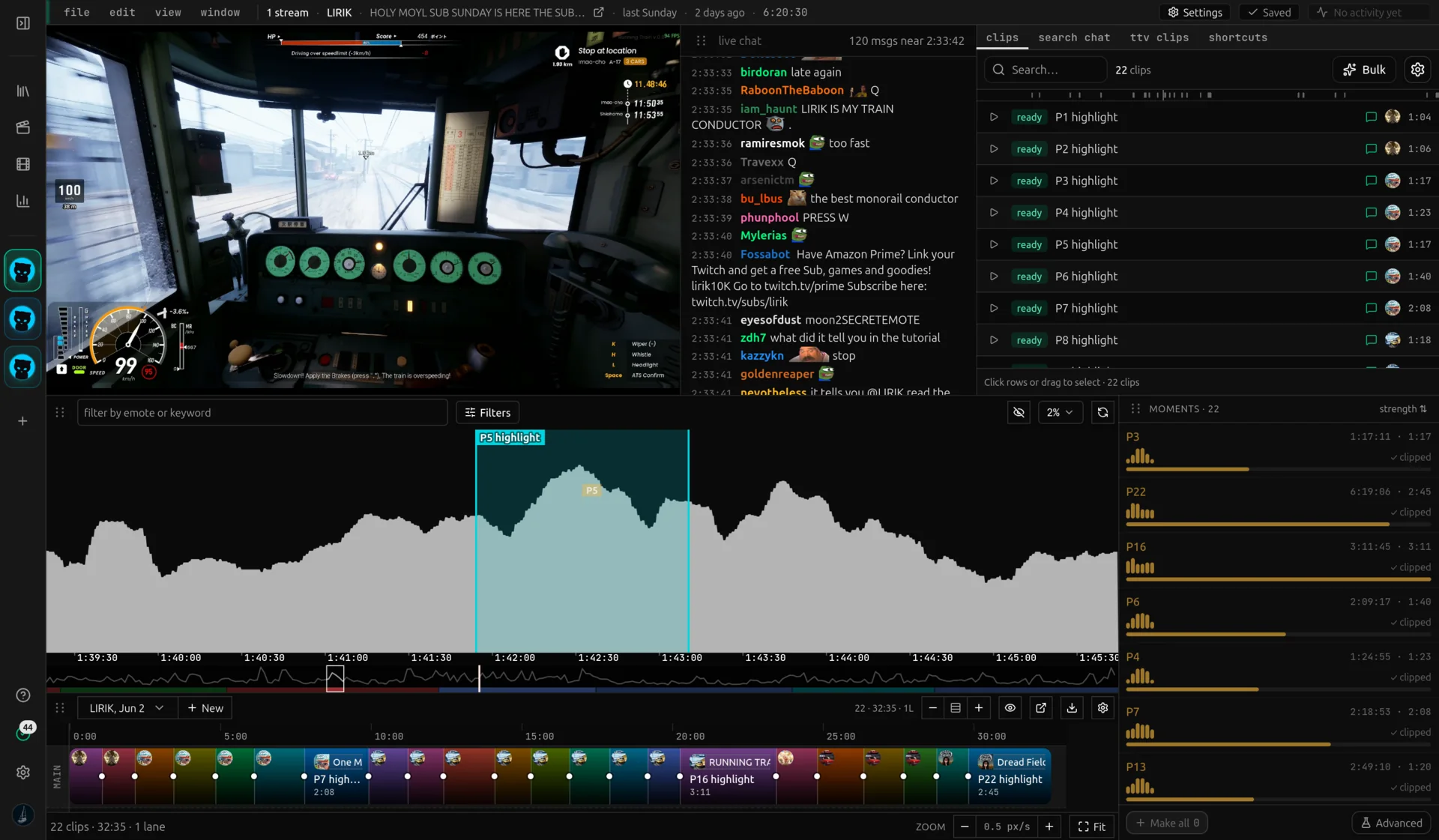
A messages-per-second graph stretches across the entire VoD. Peaks are usually clippable moments. Click to seek, drag to bracket a clip, filter by emote to narrow it down.
On an eight hour stream, scrubbing for highlights is hours of work. The chat already did the work for you. When something funny, scary, or impressive happens, message volume jumps. The graph turns that signal into a visual you can scan in five seconds.
You stop guessing and start clicking. Each tall bar gets a click, you watch the few seconds before it, and you decide whether to keep it.
Detail / 02
The chat-activity graph is a heatmap of the whole stream
Strip away the styling and the graph is one number repeated every second of the VoD: how many chat messages landed in that second. Plotted end to end, from the moment the stream started to the moment it ended, that number becomes a shape. Nothing is sampled or smoothed away, every second the stream ran gets its own bar.
Read it the way you'd read any heatmap. Tall bars are hot, flat stretches are cold. A calm ten minutes of gameplay reads as a flat line; the second chat reacts, a bar shoots up. Scanning the whole heatmap takes seconds and tells you where the stream got loud without watching a single minute of it.
Twitch's own graph under a VoD tracks concurrent viewers, a slow number that mostly reflects when people tuned in and dropped off. It says nothing about what happened on stream. This heatmap tracks reaction instead of attendance, so a stream with a flat viewer count for hours can still show two sharp chat spikes in that stretch, and those two spikes are the moments worth clipping.
The graph is most useful when filtered. A KEKW-only graph shows where chat laughed. A monkaS-only graph shows where chat got nervous. A POG-only graph shows the highlights.
Voding loads global Twitch emotes plus the channel emotes plus 7TV, BTTV, and FFZ for the streamer you opened. Multi-select dropdowns make filter combos one click away.
Detail / 04
A real session: from "opened the VoD" to "ten clip drafts"
Open a six-hour VoD. The graph paints in under three seconds because chat is already in our database, so there is no transcoding step on first view. Filter to KEKW + OMEGALUL and ninety percent of the timeline goes flat; the remaining six or seven peaks are the laughter moments. Click the tallest one. The player jumps to that timestamp and the chat log scrolls back to that second. Watch ten seconds.
If it is a clip, drag from a beat before the spike to a beat after it. A bracket appears on the graph and the clip opens in the sidebar. Name it, tag it "funny", move to the next peak. Six hours of source becomes ten clip drafts in twelve minutes. You spent zero time scrubbing.
Detail / 05
Versus scrubbing, versus tools that ignore chat
Most VoD editors treat chat as decoration: render it as a single image you cannot search, or omit it entirely. Scrubbing the source video at 8× takes an hour for an eight-hour stream and you miss things every time you blink. Voding inverts the problem. Chat already noticed every moment that mattered when it happened, and that signal is permanent. It survives the stream. The graph turns the audience into the search index, the peaks are the candidates, and the click is the seek.
About the chat activity graph
A line or bar chart showing how many chat messages were sent per second across a VoD. Tall bars mean chat reacted to something on stream, which is usually a clippable moment.
Yes. The graph zooms and pans for streams of any length. We have tested on 12 hour subathons without issue.
Yes. Add words, Twitch emotes, or 7TV, BTTV, FFZ emotes as filters. The graph re-renders showing only messages that contain at least one of the selected tokens.
Per-second. The chat log retains the original Twitch timestamps and the graph buckets them at one-second granularity. Zoom in until the bars are individual seconds for moments that happen fast (e.g. a clutch play that chat reacts to in two seconds, not twenty).
Still wondering about something? The team hangs out in our Discord and
answers there fastest.