Turn an 8-hour stream into a
clip folder before lunch.
vod.ing is a browser editor for Twitch VoDs. Request a VoD and a chat-activity graph shows you exactly where the moments are. Cut clips, render chat overlays, and export a timeline to DaVinci. The source never touches your drive.
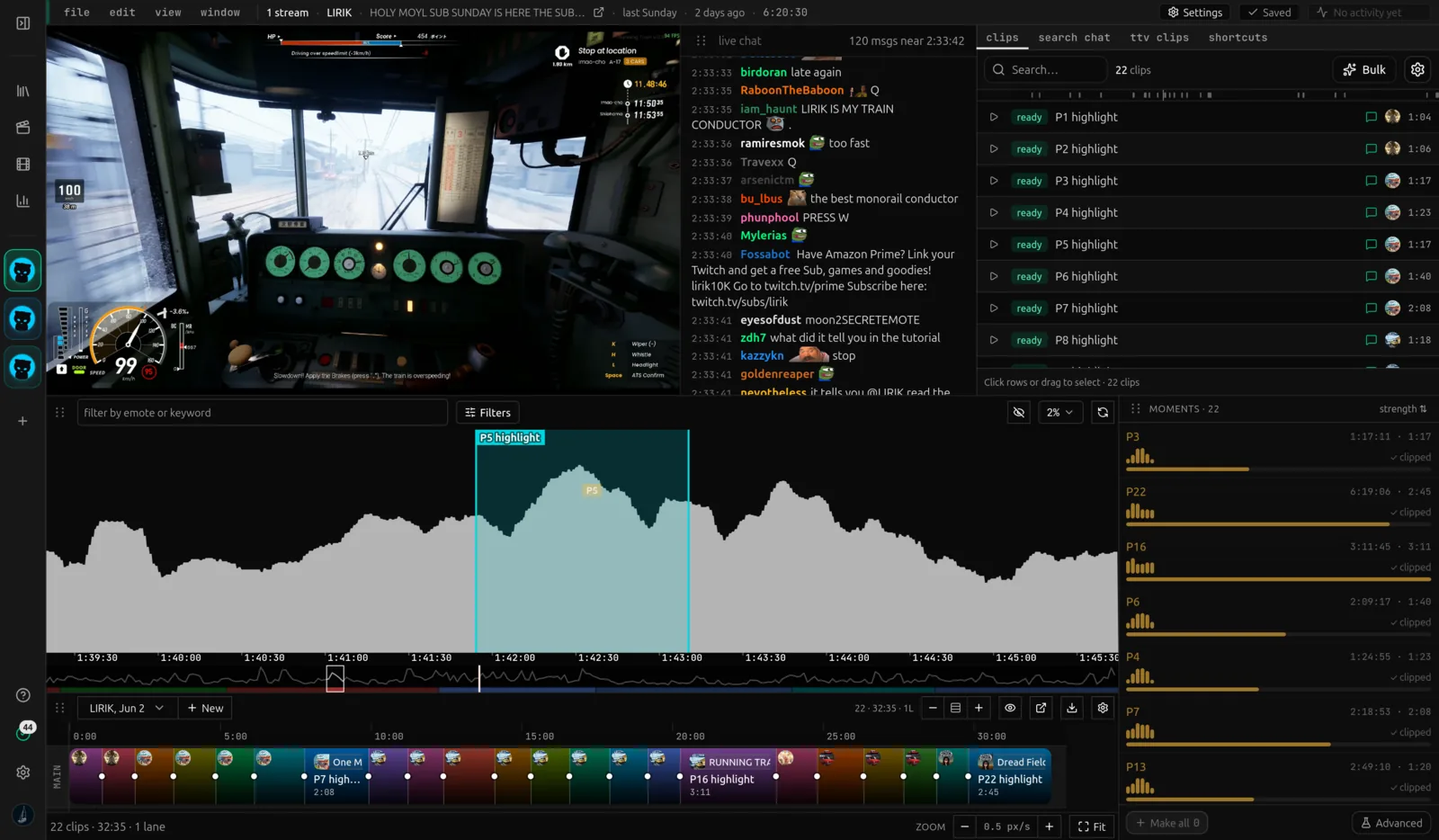
From a long stream to a clip folder, in five steps.
Chat already reacted to every moment that mattered. vod.ing turns that into the work surface. You cut, render, and export, all in the browser.
No local download
We pull the VoD and full chat onto our servers at up to 250 MB/s. Your disk stays empty.
Learn more → 02 / FindChat finds the moments
Read the activity graph, filter by emote or word, and the peaks reshape to the mood you want.
Learn more → 03 / ClipCut & organize
The chat-spike finder marks every spike on the graph; you click each one to judge it and turn keepers into clips, sorted by mood.
Learn more → 04 / RenderChat overlays in the cloud
Render a transparent chat overlay for any clip, with animated 7TV, BTTV, FFZ emotes preserved.
Learn more → 05 / ExportExport to your editor
Arrange clips, place overlays, export a Timeline. It opens fully wired in DaVinci, Premiere, or Final Cut.
Learn more →Everything in one browser tab.
The whole editor: the chat graph, multi-POV sync, overlay rendering, and timeline export, all without a single byte on your drive.
Multistream sync
Chat activity graph
Chat-spike finder
Emote filters
Timeline maker
No downloads
Clips & categories
Custom workspace


All emotes
Shared plans
Second monitor
Editor export
Quality of life
From the blog.
Field notes on Twitch VoD editing: chat replay, highlight finding, overlay rendering, multi-POV sync, and DaVinci Resolve export. All posts →
- How to Find Twitch Highlights Using Chat Activity
- How to download a Twitch VoD (and when not to)
- How to render Twitch chat as a video overlay
- How long do Twitch VoDs stay? A 2026 retention guide
- 7TV vs BTTV vs FFZ for Twitch editing
- How to sync multiple Twitch VoDs for collab edits
- FCPXML for DaVinci Resolve: a Twitch editor's guide
- Why your Twitch VoD download is slow
- The best free Twitch clipping tools in 2026
Frequently asked questions
Still wondering about something? The team hangs out in our Discord and answers there fastest.
Less scrubbing.
More editing.
Start with a 7-day free trial, no card needed. Request your first VoD and let the chat graph do the scrubbing. Import in minutes, edit in the browser, export to DaVinci.