vod.ing / features / multistream editing

Edit the whole collab. Not just one POV.

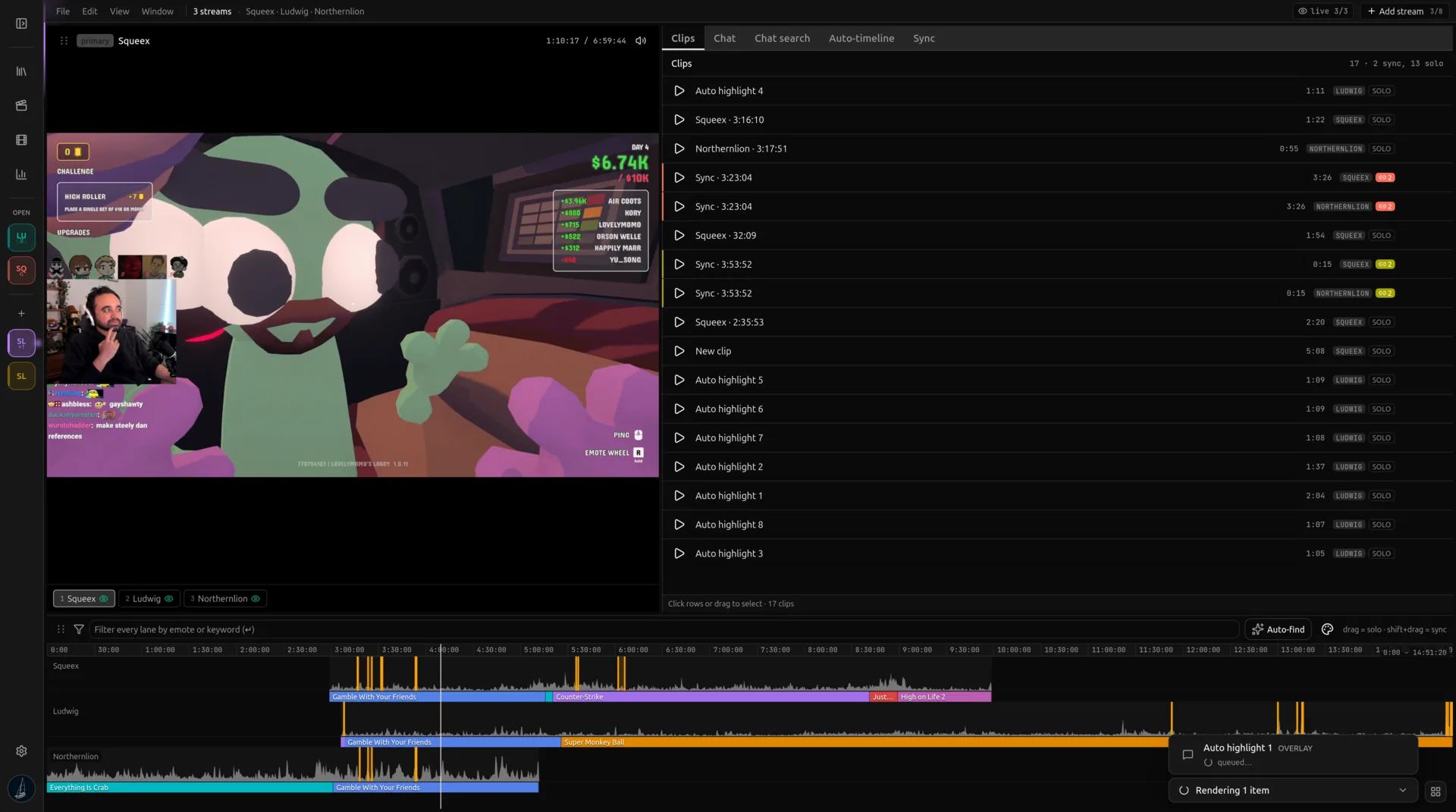
Load every streamer who was live for the same moment. Voding lines them up on a shared timeline using Twitch start timestamps and gives each angle its own chat graph, its own overlay render, and its own video track in the exported FCPXML.

disguisedtoastkaicenatsykkunoyuno_sykk
sykkunofanumpokimaneramee
quarterjadedukedennislilypichubuddha
masayoshiagent00michaelreevesvader
realtime →

Twitch already knows when each stream started

Every Twitch VoD carries a recorded_at timestamp, the second that streamer hit Go Live. Two streamers in the same collab have two timestamps within seconds of each other. That is the sync signal. The sync editor reads those timestamps, anchors each VoD to its own wall-clock origin, and lines them up.

There is no offset slider to babysit, no audio fingerprint to fail on quiet scenes, no chat-spike correlation to misfire when one streamer has a quieter chat. The timestamps are the ground truth and they are accurate to the second. The alignment math runs entirely in your browser, no extra server pass.

One graph per angle, all on the same time axis

Each loaded VoD gets its own chat activity graph stacked above the shared timeline. Where one streamer's chat spikes, the others rarely spike at the same second, and that is the point. A graph peak on one row tells you which POV caught the moment first. Drag across the shared timeline and the editor scrubs every angle at once.

Filter chips, emote filters, and the auto-highlight scanner all work per-angle. Mute a row to remove it from consideration without unloading the VoD. The workspace stays a single page no matter how many streamers were live.

Cut once, export every track

When you bracket a clip on the shared timeline, vod.ing cuts every loaded angle at those in / out points. You get one clip per angle, each with its own chat overlay if you ticked the box. They show up on the Clips page grouped by the moment, so you can scrub each POV side by side before promoting the bundle to the timeline maker.

The FCPXML packs every angle onto its own video track. Two angles land on V1 and V3, their chat overlays on V2 and V4. DaVinci opens the project with the full multi-cam already laid out. Disable tracks to cross-cut, enable two at once for split-screen, or pick the best angle per moment and bin the rest.

About multistream editing

Each VoD has a recorded_at timestamp from Twitch, the moment that streamer went live. We anchor every VoD to its own start, line them up on one wall-clock timeline, and the overlap between them is the shared editable region. No manual offset slider, no waveform matching, no chat-spike guessing.

Stop editing one POV at a time.

10 free chat overlay renders a day, no card needed. Open the editor when you're ready.