vod.ing / tools / vod sync finder
Free tool 50 channel lookups / day · sign in with Twitch · no card

Free Twitch VoD sync finder.

Paste a Twitch VoD, add the channels of everyone else who was live with them, and get the exact offset between every overlapping VoD. Download a sync timeline you drop straight into your editor — every POV already lined up to the second.

no install / 50 free lookups / day / sync timeline out / opens in DaVinci, Premiere & FCP

Why an editor needs this

Multi-cam edits — collabs, GTA RP scenes, tournaments, charity events, watch parties — all need every streamer's POV lined up to the exact same wall-clock moment before you can cut. The recorded-at timestamp on each Twitch VoD is that ground truth, accurate to the second.

This tool reads those timestamps for you. Paste one VoD, add the channels of everyone else who was live with them, and we tell you which of their recent VoDs overlapped and by how much. No audio fingerprinting, no clap-sync, no babysitting a slider.
What the sync timeline gives you

Every overlapping VoD ends up on its own track in the exported timeline, each one offset to the exact second where it actually started relative to the others. Open the file in your editor and every POV is already lined up — no dragging, no nudging.

Use it for multi-cam picks, split-screens, reaction cuts, or just to have a project file that already knows when each angle joined the broadcast.

Need to scrub all the POVs side-by-side first?

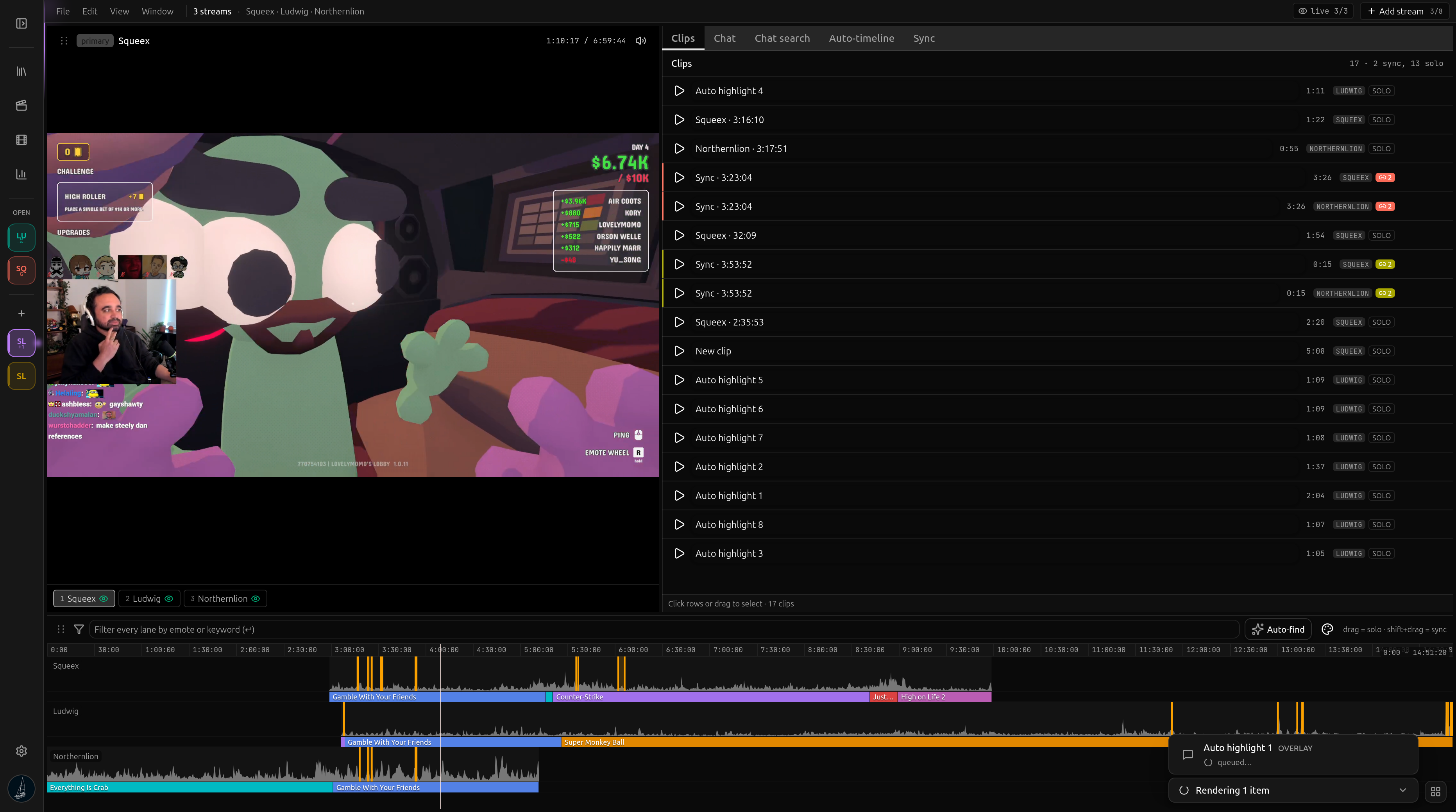
The free tool gives you the offsets and a timeline file. The full vod.ing editor goes further: load every overlapping VoD into one synced workspace, scrub all POVs at once on a shared timeline, see each angle's chat activity graph, and cut clips that span every angle at the same in/out points.

You can load as many streams as the event had — two-person collabs, six-person GTA RP scenes, tournament brackets with a dozen POVs. Per-angle chat overlays render server-side and ride above their own video track in the export.

See how the multi-stream editor works →

Or skip the export — load every POV in one editor.

The full vod.ing editor loads every overlapping VoD side-by-side. Shared timeline, per-angle chat graph, per-angle clips, bracket once and every POV gets the same in/out.

The vod.ing multi-stream sync editor with multiple Twitch VoDs lined up on one shared timeline.

About the free VoD sync finder

Paste a Twitch VoD, add other streamers' channels, and we tell you which of their recent VoDs overlapped with the one you picked, plus the exact offset between them. Download the result as a sync timeline you can open straight in DaVinci Resolve, Premiere Pro, or Final Cut Pro X — with every angle already lined up.

Want every POV side-by-side instead of a timeline file?

The paid multi-stream editor loads as many overlapping VoDs as the event had streamers, all in one workspace, with per-angle chat graphs and per-angle chat overlay rendering baked in.