vod.ing / features / customizable workspace

Lay the editor out the way you actually edit.

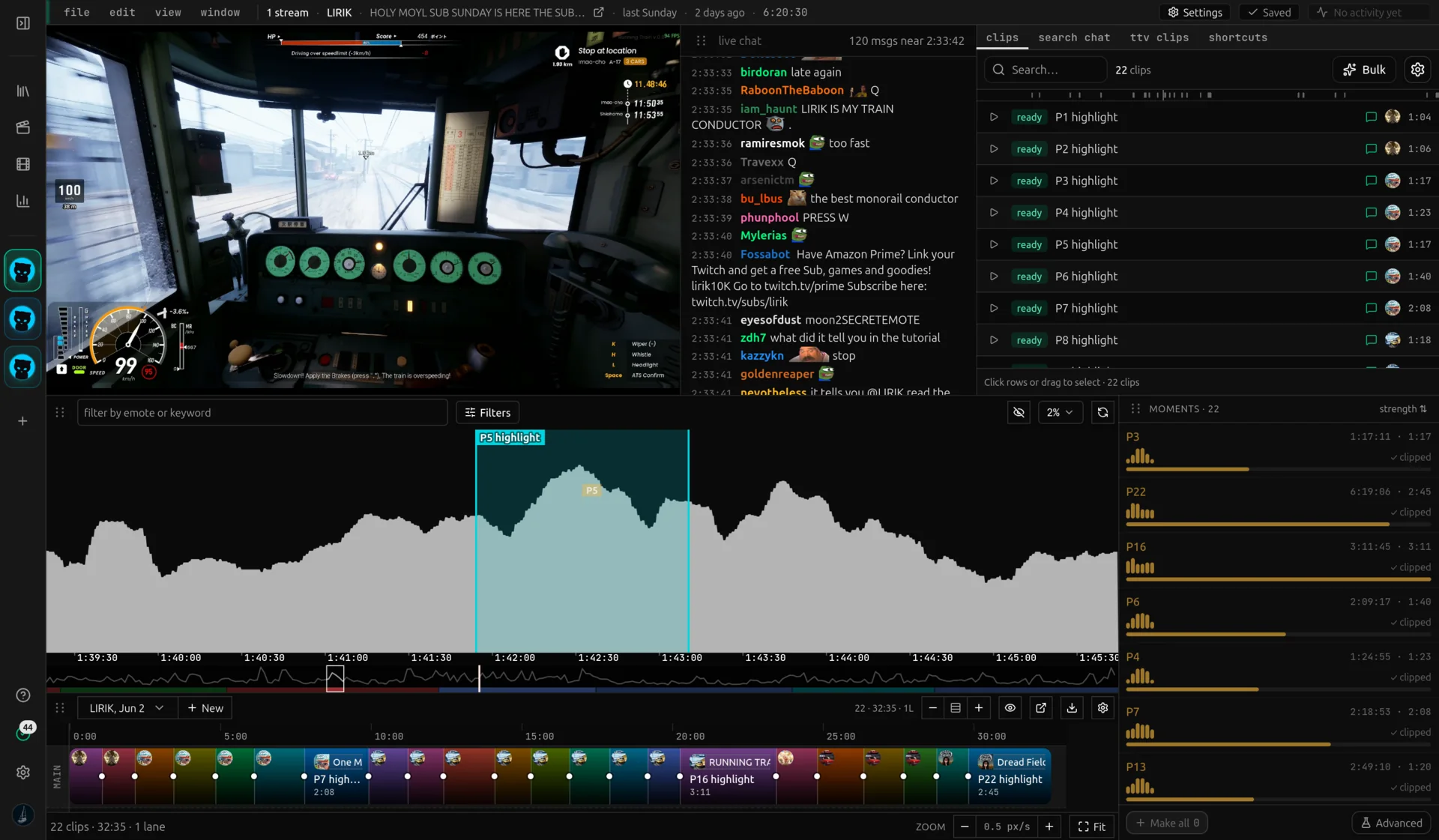
Every panel — video, chat graph, clips, live chat, search — is independent. Drag to rearrange, dock as tabs, hide what you don't use, or pop a panel out into its own window on a second monitor.

Panels, not pages

The editor isn't a fixed page with hard-coded boxes. It is a workspace of independent panels: the video player, the chat activity graph, the clip list, the chat log, search, and the TTV clips browser. Each one is its own draggable surface.

Drop a tab on another tab strip to dock as a new tab. Drop it on the edge of a panel to split that area and place the panel there. Drop it in empty space to make it a floating window. The same gesture vocabulary every dockable IDE or DCC tool uses, in your browser.
Pop out for dual-monitor editing

Right-click any tab and pick "Pop out to new window". The panel detaches into a real browser window you can drag to a second monitor. Drag it back into the original tab's drop zones to re-dock.

A common dual-monitor setup: video and chat graph stretched wide on the main display, the chat log popped out full-height on the second. You scrub on one screen and read chat in real time on the other, no window-juggling. The popout inherits the editor's theme before it paints, so there's no flash of unstyled content.

Your layout, remembered

Position, size, tab grouping, floating panels, closed panels — all of it saved to your browser's localStorage. Close the tab, come back tomorrow, the workspace is exactly how you left it.

Layouts are per browser, not per account, because most editors only edit on one rig. If you switch machines you start from the default — which is itself a sensible starting layout: video top-left, sidebar on the right, chat graph along the bottom.

Tab right-click and the layout menu

Right-click any tab to close it, close others, close all, pop the panel out, or open the layout menu. The layout menu also lives behind a small `LayoutGrid` button in the bottom-right of the workspace, and on right-click anywhere on the dock chrome.

From the layout menu you can re-add any panel you closed (Add: Video, Add: Clips, Add: Chat graph, …). Re-added panels come back as a floating window so you can drag them to wherever you want them. The "Reset to default layout" entry rebuilds the original arrangement if the workspace gets into a state you don't like.

Why customizable beats fixed

Different editing styles want different layouts. A compilation editor lives in the clip list and chat graph and barely uses the video preview. A reaction-clip editor wants a giant video panel and a chat log they can scroll while watching. A streamer-editor working a live broadcast keeps the live chat panel popped out on a second display and uses the main screen for the VoD of the previous session.

A fixed-layout editor forces everyone into the same compromise. Voding's workspace gets out of the way: pick the panels you use, arrange them how you want, leave the rest closed.

About the workspace

Yes. Right-click any tab and pick "Pop out to new window". The panel opens as a real browser window you can drag to another display. Drag it back onto the original workspace to re-dock.

Make the editor yours.

10 free chat overlay renders a day, no card needed. Open the editor when you're ready.