vod.ing / features / timeline maker

Build a DaVinci timeline in the browser.

Pick your rendered clips, drag the chat overlay where you want it on each preview, hit export. You get an FCPXML plus per-file links — drop them in one folder and the project opens in DaVinci with V1 + V2 already wired.

V1
big_plays_07 0:00
funny_14 0:18
reactions_11 0:34
compilation_23 0:52
V2
chat
chat
chat
timeline.fcpxml FCPXML 1.10

Position the chat overlay once

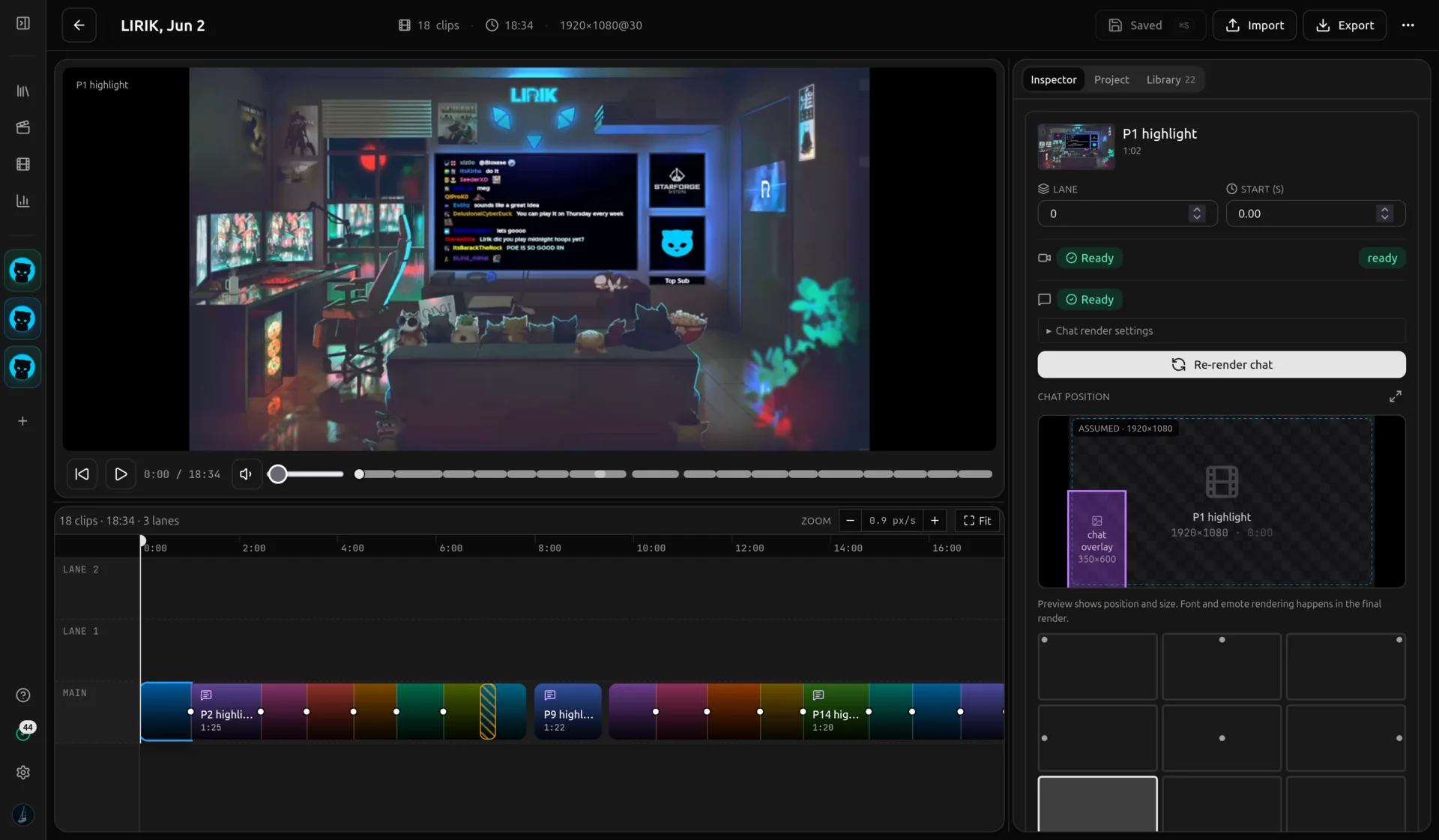
Most timelines lose a chunk of editor time to the same chore: drop the chat overlay onto V2, scale it, drag it to the right spot, repeat for every clip. The timeline maker moves that step into the browser. Each clip that has a rendered chat overlay gets a small preview canvas with a draggable ghost rectangle so you can decide where chat sits inside the frame.

That position is written straight into the project file as the V2 clip's transform. When DaVinci opens the FCPXML the chat overlay is already where you parked it. No extra fiddling, no per-clip nudging inside the editor that ate your evening last time.
Arrange and re-trim without leaving the browser

The horizontal strip is the timeline. Drag clips left or right with arrow buttons, remove ones you do not want, name the project, and pick an output frame rate and resolution. The order in the strip is the order on V1 when the project opens.

The strip is intentionally narrow in scope. It is not a re-edit of the source — that still happens in the editor, where the chat activity graph lives. Use the strip for assembly, then jump back to the editor if any clip needs its in or out point moved.

Open in DaVinci with everything wired

Export an FCPXML for DaVinci Resolve. Chat overlays land on V2 already positioned. Drop the bundle in one folder, double-click the project file. The .fcpxml plus the per-file download links for every clip MP4 and chat MOV are listed on the export page so a single download session covers the whole timeline.

The format is FCPXML 1.10, which also opens in Premiere Pro and Final Cut Pro X. The clip video sits on V1, the chat overlay sits on V2 with your saved transform applied, and the timeline frame rate and resolution match what you chose in the maker. From there it is a normal editing project — colour, music, cuts, whatever you bring.

About the timeline maker

FCPXML 1.10. Tested with DaVinci Resolve. Premiere Pro and Final Cut Pro X also accept the format. Drop the .fcpxml file and the matching clip MP4 and chat MOV files into the same folder, then open the project file.

Export to DaVinci in one click.

10 free chat overlay renders a day, no card needed. Open the editor when you're ready.